Company

Send one message to hundreds or thousands of contacts at once while keeping every reply organized in its own private thread.
Key Benefits

Instead of sending the same message over and over, write it once and deliver it to your entire list in a single step.

Text messages are typically opened within minutes. When timing matters, SMS helps ensure your message is seen quickly.

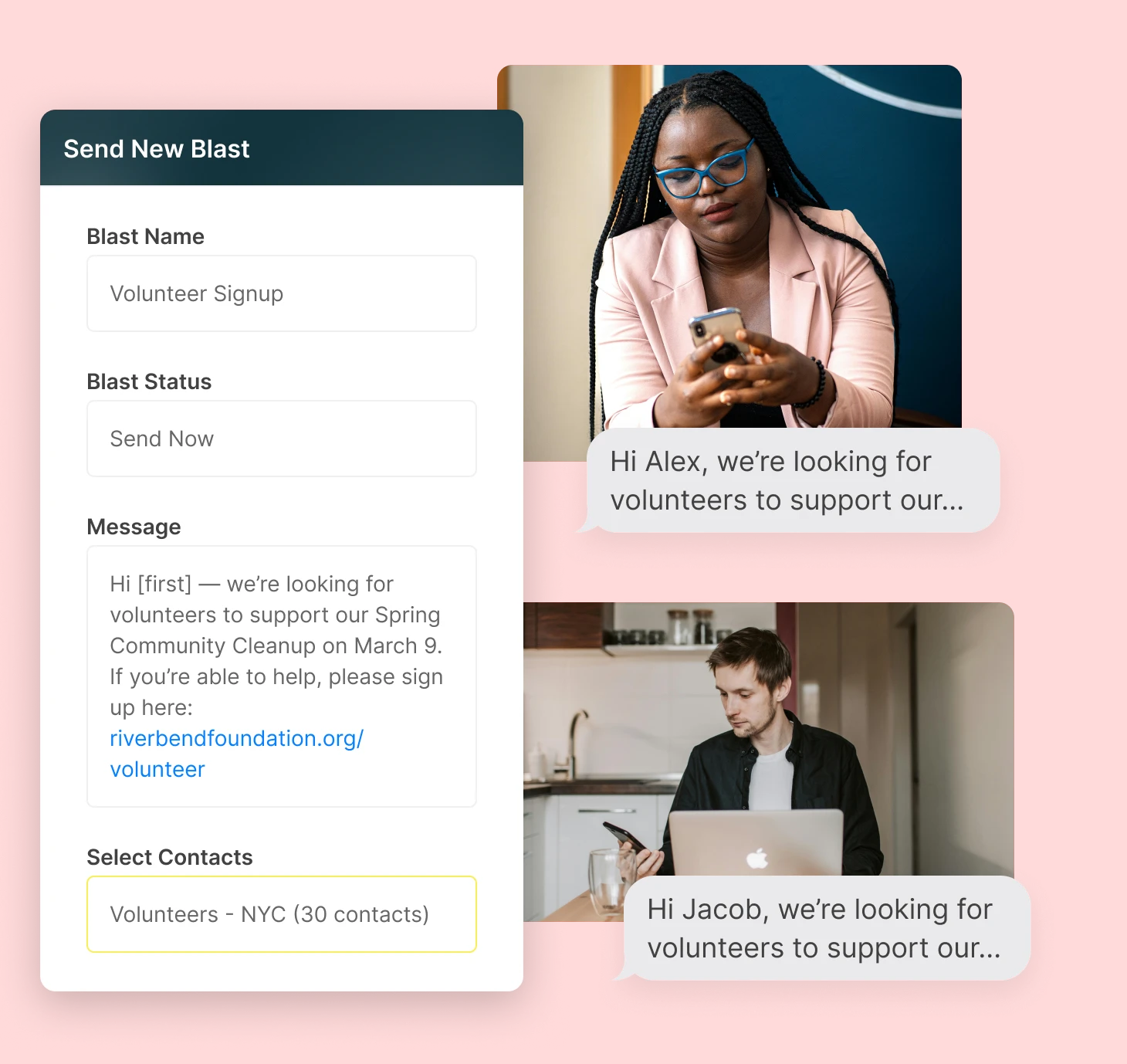
Add custom variables like names, appointment times, case numbers, or locations so each message feels relevant and specific to the recipient.
Every response is delivered into its own private one-to-one conversation thread. Recipients never see each other, and your team can respond individually with full context.

Capabilities
TextBetter is built for one-to-many messaging, helping you reach large contact lists while keeping replies, personalization, and delivery organized.
Personalization should reflect how your business actually operates. Along with standard fields, you can create custom variables that match your workflow. Add appointment dates, case numbers, service windows, locations, or account details so each message includes information that matters to the recipient.
Manage contact lists in the way that works best for your team. Create them manually, upload a CSV file, or organize contacts through keyword responses. When someone texts JOIN or SUBSCRIBE, they can be automatically added to the appropriate list for future messages.
Each reply to a text blast comes back as its own private conversation. Your team can see the full message history, respond individually, and keep context intact without moving between systems. Outbound messages and inbound replies remain connected in one place.
TextBetter includes delivery controls that help manage send speed and message flow. Opt-ins and opt-outs are handled automatically, helping ensure recipients only receive messages they have agreed to receive. Whether you are contacting hundreds or thousands of people, communication stays organized, trackable, and aligned with messaging requirements.


Personalization should reflect how your business actually operates. Along with standard fields, you can create custom variables that match your workflow. Add appointment dates, case numbers, service windows, locations, or account details so each message includes information that matters to the recipient.
Manage contact lists in the way that works best for your team. Create them manually, upload a CSV file, or organize contacts through keyword responses. When someone texts JOIN or SUBSCRIBE, they can be automatically added to the appropriate list for future messages.
Each reply to a text blast comes back as its own private conversation. Your team can see the full message history, respond individually, and keep context intact without moving between systems. Outbound messages and inbound replies remain connected in one place.
TextBetter includes delivery controls that help manage send speed and message flow. Opt-ins and opt-outs are handled automatically, helping ensure recipients only receive messages they have agreed to receive. Whether you are contacting hundreds or thousands of people, communication stays organized, trackable, and aligned with messaging requirements.
Roles

Notify customers about schedule changes, appointment windows, or service updates in one send while managing replies in private threads.

Send reminders, confirmations, or updates to groups of prospects and continue conversations privately when they reply.

Share updates with opted-in contacts using personalized fields while keeping replies organized and private.

Maintain visibility into outbound messages while enforcing opt-ins, opt-outs, and organized reply management.

Upload contact lists, manage structured data, and support system-based imports for high-volume messaging.
Notify customers about schedule changes, appointment windows, or service updates in one send while managing replies in private threads.
Send reminders, confirmations, or updates to groups of prospects and continue conversations privately when they reply.
Share updates with opted-in contacts using personalized fields while keeping replies organized and private.
Maintain visibility into outbound messages while enforcing opt-ins, opt-outs, and organized reply management.
Upload contact lists, manage structured data, and support system-based imports for high-volume messaging.
Testimonials
Features

Define your own personalization fields so each message includes accurate, relevant details.

Automatically build lists when contacts text specific keywords.

Include images to provide additional context or clarity.

Schedule messages in advance to stay organized and consistent.

Maintain visibility across outbound sends and inbound replies in one place.
Yes. You can insert standard fields like first name, last name, and company name, or create your own custom variables such as appointment date, appointment time, case number, event reminders, or location. Each recipient receives a personalized message even though it’s sent as a single mass texting blast.
Yes. You can create lists manually, upload contact lists, or build segments using keyword-based triggers (e.g., people who text in “JOIN”). This makes it easy to group contacts and send targeted messages.
Each reply goes into a private 1:1 conversation thread in the TextBetter platform. Recipients never see each other, and teams can respond just like any normal text conversation.
Yes. If your number is text-enabled with TextBetter, you can send blasts directly from your existing landline phone number. TextBetter can provide you with a dedicated virtual number, or toll-free number, if needed.
You can send to large lists, including hundreds or thousands of contacts. TextBetter uses built-in send controls, such as message throttling, to help improve deliverability for high-volume sends.
Yes. You can set up keywords so that when someone texts a specific word or phrase, they are automatically added to a specific list or segment.
No. Even though the initial send is a text message blast, replies always stay private and 1:1.
Not unless you prefer one. You can send messages from your existing landline number or a dedicated number—whatever fits your workflow.
Yes. You can send MMS messaging blasts that include images, subject to standard carrier size limits.
Landline texting solutions built for business
Prefer to talk it through? Call us at (800) 322-1112